
Scriptable List
ScriptableList<T> is a type of scriptable object that holds a list of values. It acts just like a regular List<T>, but it is a scriptable object that can be used in the inspector and be passed around to other objects.
ScriptableGameObjectList is already included in the package and can be used to create a list of game objects. But it may be more useful to create your own list for a specific component. See Creating a List for more information.
ScriptableList<T> implements IList<T>, IReadOnlyList<T>, and IList. However, it does not always expose those implemented methods. To access them you need to explicitly cast the list to the interface you want to use.
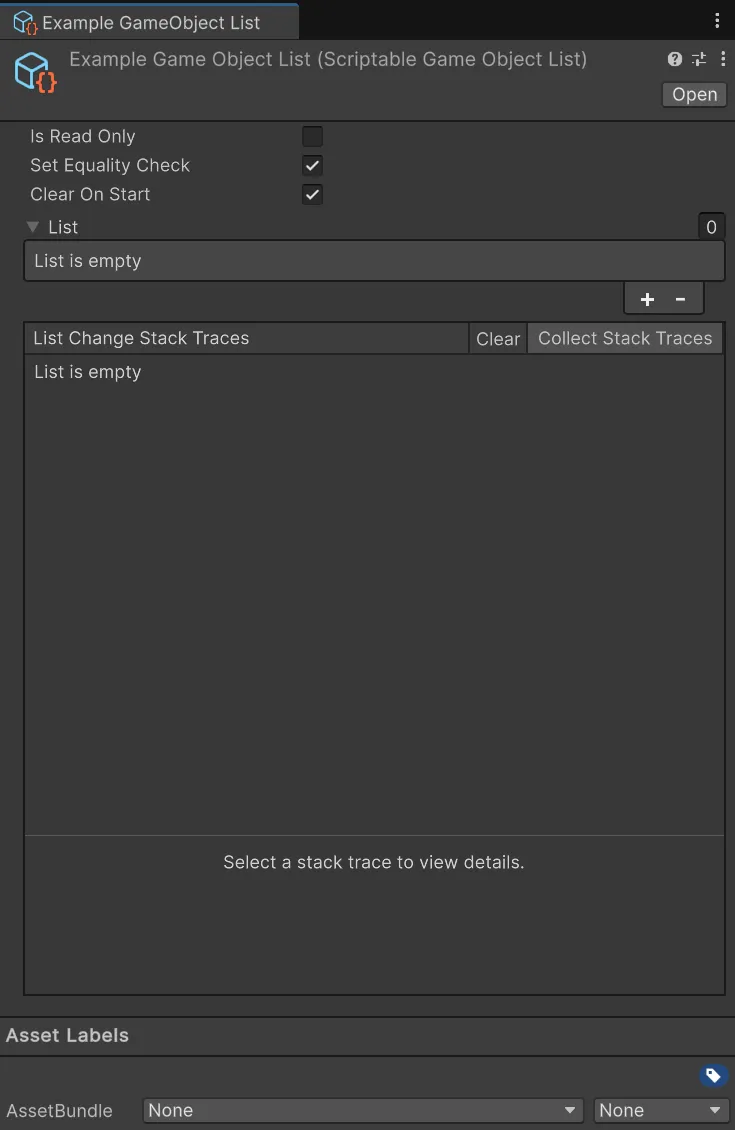
Using a Scriptable List in your code is really straight forward. You use the Add, Remove, and Clear methods to manage the list.
Add will add an object to the list.
using UnityEngine;using Hertzole.ScriptableValues;
public class Inventory : MonoBehaviour{    [SerializeField]    private ScriptableList<Item> items;
    public void AddItem(Item item)    {        items.Add(item);    }}
Remove will remove an object from the list.
using UnityEngine;using Hertzole.ScriptableValues;
public class Inventory : MonoBehaviour{    [SerializeField]    private ScriptableList<Item> items;
    public void RemoveItem(Item item)    {        items.Remove(item);    }}
Clear will remove all objects from the list. This is useful for cleaning up the list when it is no longer needed, like when quitting or changing scenes.
using UnityEngine;using Hertzole.ScriptableValues;
public class Inventory : MonoBehaviour{    [SerializeField]    private ScriptableList<Item> items;
    public void Clear()    {        items.Clear();    }}
You can also access the list directly using the Value property. This will return the list of values, which you can use just like a regular list.
using UnityEngine;using Hertzole.ScriptableValues;
public class Inventory : MonoBehaviour{    [SerializeField]    private ScriptableList<Item> items;
    public void PrintItems()    {        for (int i = 0; i < items.Value.Count; i++)        {            Debug.Log(items.Value[i]);        }    }}
You can listen to changes in the list using the OnCollectionChanged event.
using UnityEngine;using Hertzole.ScriptableValues;using System.Collections.Specialized;
public class Inventory : MonoBehaviour{    [SerializeField]    private ScriptableList<Item> items;
    private void OnEnable()    {        items.OnCollectionChanged += OnListChanged;    }
    private void OnDisable()    {        items.OnCollectionChanged -= OnListChanged;    }
    private void OnListChanged(CollectionChangedArgs<Item> args)    {        // Action is a NotifyCollectionChangedAction        Debug.Log("Action: " + args.Action);        // New Index is the index of the item(s) that was added        Debug.Log("New Index: " + args.NewIndex);        // Old Index is the index of the item(s) that was removed        Debug.Log("Old Index: " + args.OldIndex);        // New Items is the item(s) that was added as a Memory<T>        Debug.Log("New Items: " + args.NewItems);        // Old Items is the item(s) that was removed as a Memory<T>        Debug.Log("Old Items: " + args.OldItems);    }}
Remember to unsubscribe from events when you no longer need them. See the events section for more information.
There are many more methods available on the list, such as Contains, IndexOf, and Sort. It aims to have full parity with the regular List<T> class. See the reference for all available methods and properties.
Listening to Collections
Section titled “Listening to Collections”Listening to collection changes includes a lot of parameters to keep track of. This table will help you understand when to use which parameter and when each action is invoked. If a specific parameter is not mentioned in its respective action, it is not used and can be ignored.
| Action | When Invoked | Parameters |
|---|---|---|
| Add | When one or multiple items are added to the collection. | NewIndex is the index of the first item added. NewItems are the item(s) that were added. If it’s a single item, NewItems will have a length of 1. |
| Remove | When one or multiple items were removed from the collection. | OldIndex is the index of the first item removed. OldItems are the item(s) that were removed. If it’s a single item, OldItems will have a length of 1. |
| Replace | When one or multiple items were replaced in the collection. They could be replaced using the indexer, using Reverse or Sort. | NewIndex and OldIndex are the index of the first item replaced. NewItems are the item(s) that were set. OldItems are the item(s) that were replaced. If it’s a single item, NewItems and OldItems will have a length of 1. |
| Reset | When the collection is cleared. | NewIndex and OldIndex are both 0. OldItems are the item(s) that were removed from the collection. |
Troubleshooting
Empty or Incorrect Items
When accessing NewItems or OldItems, the items may be empty or not the ones in the collection.
You have probably accessed these items outside the scope of the collection event. NewItems and OldItems are pooled Memory<T> objects and are returned to the pool when the event is done. This means that you should copy the items to a new array or list if you want to use them outside the event.
using System;using UnityEngine;using Hertzole.ScriptableValues;
public class Inventory : MonoBehaviour{    [SerializeField]    private ScriptableList<Item> items;
    private void OnEnable()    {        items.OnCollectionChanged += OnListChanged;    }
    private void OnDisable()    {        items.OnCollectionChanged -= OnListChanged;    }
    private void OnListChanged(CollectionChangedArgs<Item> args)    {        Item[] newItems = args.NewItems.ToArray();        Item[] oldItems = args.OldItems.ToArray();
        // You may now use newItems and oldItems whenever you want.        // There are other ways to copy data, but this is the simplest (but not the most performant).    }}
Properties
Section titled “Properties”The following properties are available on all Scriptable List:
Is Read Only
Section titled “Is Read Only”Marks the scriptable list as read-only. This means that the list cannot be changed at runtime and will always have the same value. This is useful for lists that are set in the editor and should not be changed at runtime.
Set Equality Check
Section titled “Set Equality Check”When this is enabled OnCollectionChanged will not be triggered when a list item is set to the same value as it already has. This is useful for lists that are set frequently and should not trigger the events when the value is the same.
Clear On Start
Section titled “Clear On Start”Clears the list when the game starts. This is useful for lists that should be cleared when the game starts, such as a list of enemies. Disabling this will keep the list from the last play session.
Capacity
Section titled “Capacity”The capacity of the list. This is the number of items that can be stored in the list before it needs to be resized. This can be set before adding a bunch of items to the list to avoid resizing the list multiple times. This is useful for performance reasons.
The actual number of items in the list.
Creating a List
Section titled “Creating a List”You need to create a list first before you can use it in the editor. Fortunately, this is really easy to do! All you need to do is inherit from ScriptableList<T>.
using UnityEngine;using Hertzole.ScriptableValues;
[CreateAssetMenu(fileName = "New Item List", menuName = "Scriptable Values/Item List")]public class ItemList : ScriptableList<Item>{    // You can add any custom functionality here if you want.    // There are no methods to override, but you can add your own methods.}