
Event Listener
Event Listener is a component that allows you to hook up events from a scriptable event in the inspector.
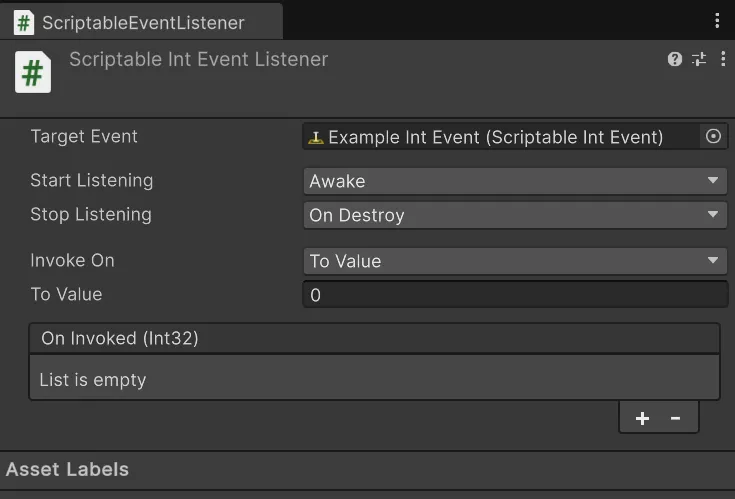
Assign a scriptable event to the Target Event field of the component.
Then pick when you want to start listening. You can pick between Awake, Start, and OnEnable.
Awake: The event will be triggered when the value changes in theAwakemethod.Start: The event will be triggered when the value changes in theStartmethod.OnEnable: The event will be triggered when the value changes in theOnEnablemethod.
Then pick when you want to stop listening. You can pick between OnDestroy and OnDisable.
OnDestroy: The event will be triggered when the value changes in theOnDestroymethod.OnDisable: The event will be triggered when the value changes in theOnDisablemethod.
After that you can pick when you want the events to be triggered. You can pick between Any, From Value, and To Value.
Any: The event will be triggered any time the event is invoked.From Value: The event will be triggered when the event is invoked from the value you set in the inspector.To Value: The event will be triggered when the event is invoked to the value you set in the inspector.
Extending
Section titled “Extending”Event Listeners are extended by inheriting from the ScriptableEventListener<T> class. This will allow you to create your own event listeners for your own types.
using Hertzole.ScriptableValues;using UnityEngine;
public class MyEventListener : ScriptableEventListener<MyValueType>{    // Simple as that!}
You can also override methods based around the invoking of events.
using Hertzole.ScriptableValues;using UnityEngine;
public class MyEventListener : ScriptableEventListener<MyValueType>{    protected override bool OnBeforeEventInvoked(object sender, MyValueType args)    {        // Do something before the event is invoked.        return true; // Return false to cancel the invocation.    }
    protected override void OnEventInvoked(object sender, MyValueType args)    {        // Do something after the event is invoked.    }}